

One identity layer for
every application
How QwikLive centralizes sign-in, access, and tenant isolation — so every product is secure on day one, and no team ever rebuilds authentication again.
The hidden cost of rebuilding sign-in in every app
Every new application starts with the same quiet assumption: it needs its own way to log people in. A login screen here, a password reset there, a separate list of who is allowed to do what. Individually each looks small. Across a growing portfolio of products they become one of the most expensive — and most dangerous — things an organization owns.
The reason is structural. Authentication, access control, and user management are not really features of any single app; they are shared concerns. When each app solves them independently, security drifts apart — one product enforces strong passwords, another quietly doesn't — effort is duplicated, and every new app widens the surface an attacker can probe. The capability meant to protect the business becomes the thing the business has to keep re-securing.
One identity layer instead of auth in every app
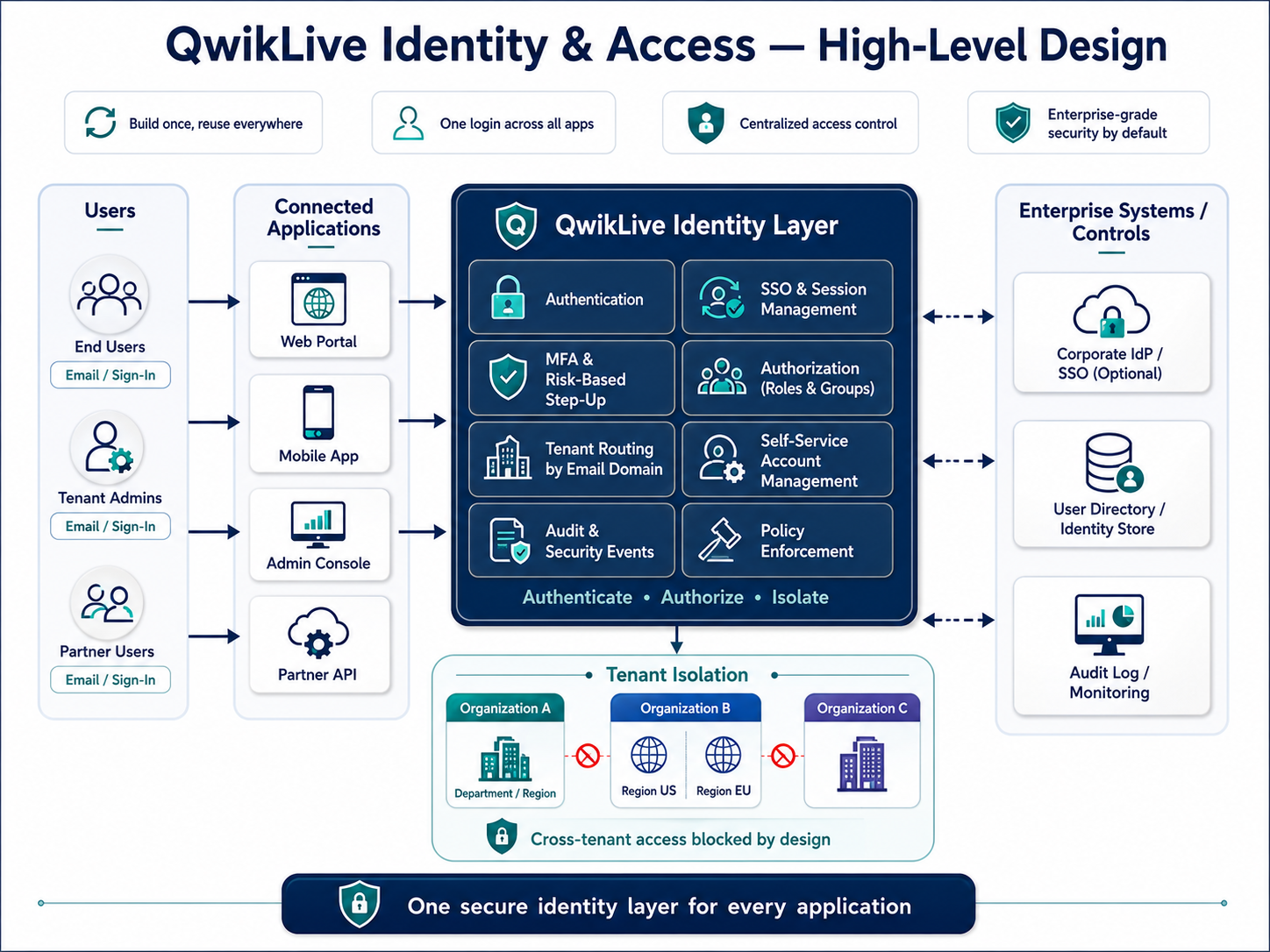
QwikLive removes that duplication by making identity a layer every application shares rather than something each one re-implements. Sign-in, access decisions, and the full life of a user account all live in one place. Applications don't store passwords, don't run their own login logic, and don't decide permissions on their own — they delegate to the identity layer and trust its answer.
The leverage comes from that boundary. A security improvement — stronger sign-in, a new second factor, tighter session rules — is made once, and every application inherits it instantly. Onboarding a new product means connecting it to the identity layer, not building authentication from scratch.
Build once, reuse everywhere
New apps connect to identity instead of rebuilding it — secure sign-in is available from day one.
One consistent posture
The same rules protect every application, so there is no weak product for an attacker to find.
Smaller attack surface
Credentials live in one hardened place, not scattered across every codebase that handles a login.
Change in one place
Tighten a policy or add a factor once, and every application inherits the improvement instantly.
How sign-in is protected end to end
A login is only as safe as its weakest point between the user's device and the system that checks it. QwikLive is built so a user's credentials are protected the entire way — not just while they cross the network, but at every system that handles them in between.
In practice, the sensitive parts of a login are concealed before they ever leave the user's device, so the components a request passes through on its way in never see them in readable form. Only the identity layer itself can unlock and verify them. If any intermediate system were ever compromised, or its logs inspected, there would be nothing usable to find.
Once a person is signed in, the session that keeps them signed in is hardened too: it cannot be read or stolen by malicious scripts running in the browser, and it is scoped so it cannot be lifted and replayed somewhere else.
Transport encryption protects data while it moves, but it stops at the front door — every gateway, proxy, and logging system behind it can potentially see what came through. Protecting credentials end to end closes that gap, which is exactly the assurance regulated industries such as finance, healthcare, and government expect of any system that handles personal data.
End-to-end credential protection
Sensitive login data is unreadable to every system between the user and the identity layer.
Hardened sessions
Session tokens resist theft by browser scripts and cannot be replayed elsewhere.
Nothing useful at the intermediaries
Compromised proxies or logs reveal no plaintext credentials.
Full audit trail
Every authentication event is recorded for security review.
Keeping every tenant truly separate
Most QwikLive deployments serve many organizations from one platform — different banks, business clients, or partners sharing the same software without ever sharing each other's users or data. The hard part of that model is isolation: one customer's administrator must never be able to see, touch, or affect another's.
QwikLive solves this by making each organization a fully self-contained identity space. Each tenant has its own users, its own sign-in rules, its own branding on the login screen, and its own administrators. A login that is valid for one tenant is meaningless in another. Within a tenant, smaller units — departments, regions, teams — can be carved out as sub-tenants that inherit the parent's rules while keeping their own membership and scope.
Isolation that depends on every application "remembering to check" eventually fails — one missed check, and tenants bleed into each other. QwikLive enforces the boundary beneath the applications, in the identity layer itself. That makes cross-tenant leakage structurally impossible rather than merely unlikely.
Complete user separation
An account in one organization is entirely distinct from any account in another.
Independent rules per tenant
One organization can require multi-factor sign-in while another keeps it optional.
White-labeled login
Each organization gets its own branded sign-in experience out of the box.
Contained blast radius
A compromised administrator in one tenant has zero reach into any other.
One login across everything, routed automatically
Users shouldn't have to know — or declare — which organization they belong to, and they shouldn't have to log in again every time they move between apps. QwikLive delivers a single sign-on experience where one login carries the user across every connected application, and where the system works out which organization they belong to on its own.
It does this from something the user already types: their email. The domain of the address tells QwikLive which organization the person belongs to and routes them to the right tenant automatically — no dropdowns, no "select your company" step. From there, a single sign-in unlocks every app the organization uses.
For larger clients that already run their own corporate login, QwikLive can hand authentication off to that system instead, while still recognizing and routing the user the same way.
Every manual step in a login is a step users get wrong and a reason they call support. Recognizing the organization automatically makes enterprise onboarding nearly instantaneous — add a client's email domain and their whole team can sign in immediately.
Layered protection for accounts
No single control stops every attack, so QwikLive wraps several around every account — each one catching what the others miss.
Attackers don't try one technique; they try the cheapest one first and escalate. Layering defenses means breaking through one doesn't grant access — and tuning the level of protection to the risk of the action keeps everyday users fast while making the valuable targets hard to reach.
Access that follows the person, not the app
Signing someone in is only half the job; the other half is deciding what they are allowed to do — and keeping that answer consistent across every application. In QwikLive, what a person can do is defined once, at the identity layer, and every app honors the same answer.
Access is organized around roles and group membership rather than per-app permission lists. A person's role travels with them: grant a role centrally and every connected application immediately reflects it; revoke it and access disappears everywhere at once.
The same layer manages the rest of an account's life: verifying new users' email addresses, letting people securely reset their own forgotten passwords, and notifying them when something security-relevant changes. None of this has to be rebuilt inside each product.
When permissions live inside individual apps, they drift — someone is removed from one system but lingers in another. Centralizing access means there is one truth about who can do what, which is both safer and far simpler to audit.
One source of truth for access
Roles are defined centrally and honored identically by every connected application.
Instant grant & revoke everywhere
Change someone's access once and it takes effect across all apps at the same moment.
Self-service account lifecycle
Email verification, password reset, and security notifications work the same in every product.
Audit-ready by design
Who has access — and who changed it — is always answerable from one place.
Enterprise-grade by default
An identity platform only earns trust if it behaves like production infrastructure for regulated industries. QwikLive builds the operational concerns in rather than leaving each project to reinvent them.
Security by design
Credential protection, hardened sessions, and strong-auth defaults ship with the platform, not as add-ons.
Full auditability
Every sign-in, access change, and security event is recorded and available for review.
Built to scale
One platform serves many organizations and large user bases without duplicating identity per app.
Change without rebuilds
Tighten a policy or add a factor once — every application inherits it immediately.
The takeaway
Identity becomes a capability, not a chore
The speed and safety of every product an organization ships comes down to how well it can answer three questions: who is this person, what may they do, and which organization do they belong to. By answering them once, in a shared identity layer, QwikLive lets teams launch secure applications faster, keep every tenant cleanly isolated, and raise the security bar everywhere at the same time — without rebuilding authentication for each new product.
